
All Integrations

Practice management

Vinyl + Karbon

Turn every client meeting into a clean, shared record inside Karbon. Vinyl captures the conversation, identifies attendees, and posts a polished summary.

How it connects

From conversation to Karbon, automatically

  1. Keep records in sync

    Vinyl syncs clients and contacts from Karbon into Vinyl, keeping names and relationships up to date. So every meeting is recognised against the right people and entities, with notes and actions linked automatically.Vinyl syncs clients and contacts from Karbon into Vinyl, keeping names and relationships up to date. So every meeting is recognized against the right people and entities, with notes and actions linked automatically.

  2. Post summaries to timelines

    Right after the call, a clear summary (an overview, the key discussions and the action items with their owners and dates) lands on each matched timeline, with a link back to the meeting in Vinyl.

  3. Save the actions that matter

    Action items, owners and due dates are saved with the related client, giving your team instant visibility and fewer follow-ups.

From meeting to timeline in minutes

Connect once and let Vinyl do the admin. For each meeting, Vinyl recognises who was in the room, compiles the notes, and posts a neatly formatted summary to the relevant Karbon timelines.Connect once and let Vinyl do the admin. For each meeting, Vinyl recognizes who was in the room, compiles the notes, and posts a neatly formatted summary to the relevant Karbon timelines.

a woman sitting at a table with a laptop

Actions that move the work forward

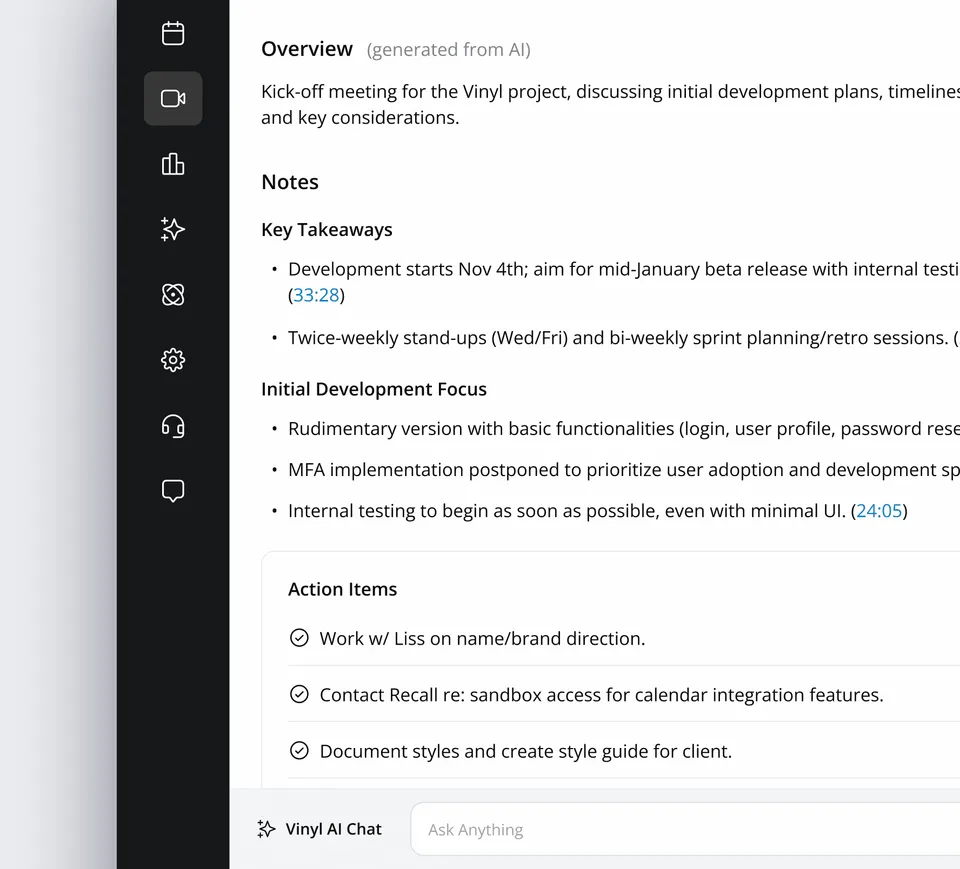
Vinyl highlights commitments and due dates and saves them to the correct client or group. Your team can jump straight into delivery with the full context.

A Vinyl meeting record showing the AI overview, key takeaways and action items

What syncs to Karbon

  • Summary on the timeline

    A concise recap of what was discussed and decided, filed to each matched contact, client or group.

  • A link back to the meeting

    The transcript and recording stay in Vinyl, one click away from Karbon for search, review and sharing.

  • Action items, owners & dates

    The next steps, owners, due dates and key discussions are saved with the client record, so nothing gets lost between meetings.

  • See where every meeting filed

    Each meeting shows where it filed in Karbon, and anything that didn’t file can be fixed in one place.

Start capturing meetings with Vinyl today

“The transcription is accurate, the notes are beautifully structured, and the way it syncs straight into our Karbon workflow is a genuine game changer.”

Karen AndrewsXero App Store review